 StashSage for POE2
Importances are normalized per model. Values shown as percentages.
Top 10 Mods for Item Value
Browse trained models (collapsed by default)
Why StashSage
Does this sound like you?
- You pick up items that could be good, but aren't quite sure
- Your stash fills up with "I'll price this later" items
- Pricing through the in-game trade UI feels tedious, so you avoid it
- Typing mods, comparing rolls, and overthinking prices takes more effort than it's worth
- You don't need a perfect price - you just want a smart starting point
- One hotkey, instant comparable items, list it, and get back to mapping
No Single Ground Truth
There is no single "right" answer for an item's price. Demand changes with every league and patch, so yesterday's completed sales may not represent today's market.
Trading Reality
The data we see is from items that haven't yet sold. Expensive listings linger while good deals disappear, so raw trade results are noisy and unreliable on their own. If anything, they may represent a price ceiling.
How We Measure Value
StashSage focuses on practical shortcuts instead of perfect accuracy. We look for tools that help you:
- Judge a reasonable listing price in seconds.
- Track and encode market dynamics.
- Avoid obvious price trolls or stale posts.
Bottom line: our goal is faster choices. If you spend less time scrolling trade listings and
more time playing, the system is doing its job, even if some items never sell.
Explore Features
Discord API
- Select or hover over the item in game for which you'd like to see price predictions.
- Press
CTRL+Cto copy the item's in-game description. - Paste the description to StashSage Serve bot in our Discord channel to receive your predictions.
- Note: some features such as mod value filtering and visualizations not available on Discord API
The bot prices against multiple leagues — Forbidden Rites and Runes of Aldur. Every prediction reply shows which league answered, and you can switch with:
!league— check which league you're currently priced against.!league list— see every league currently installed.!league set <league>— save your preference, e.g.!league set forbidden-ritesor!league set runes-of-aldur.
Your choice is saved per Discord user and follows you across servers and DMs.
Want this in your own Discord server? Invite the StashSage bot — no setup on your end, just @mention it or paste an item in any channel.
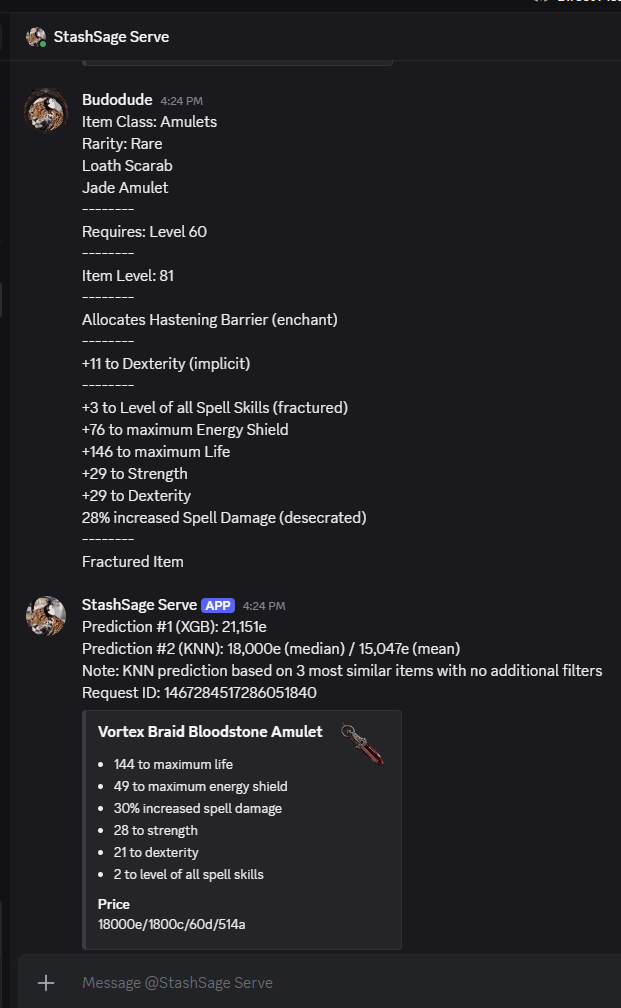
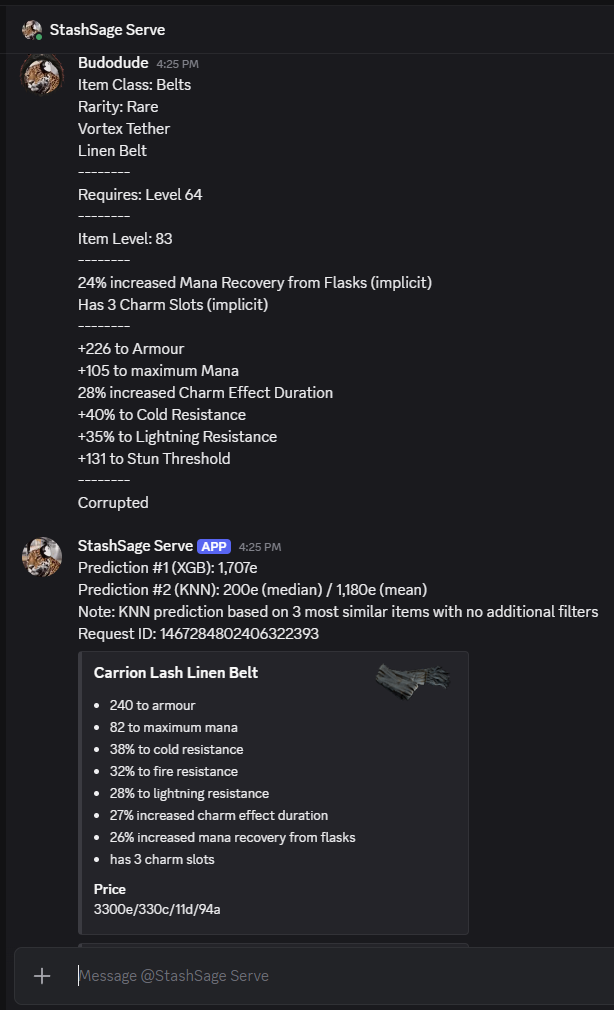
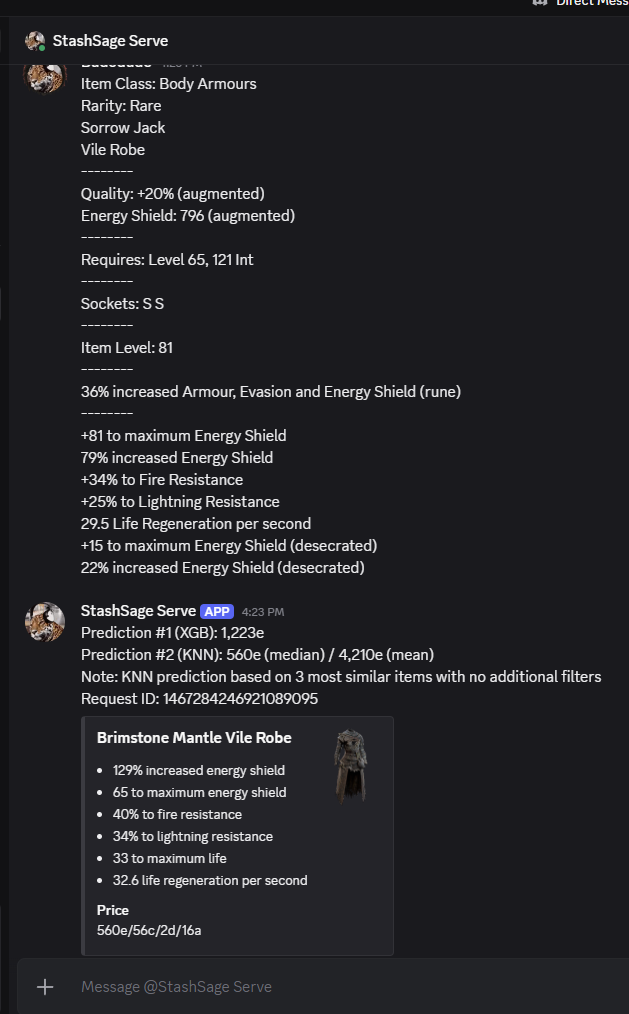
Prediction Overlay
- Select or hover over the item in game for which you'd like to see price predictions.
- Press
CTRL+1(or custom hotkey) to bring up the (unfiltered) prediction overlay. - Press
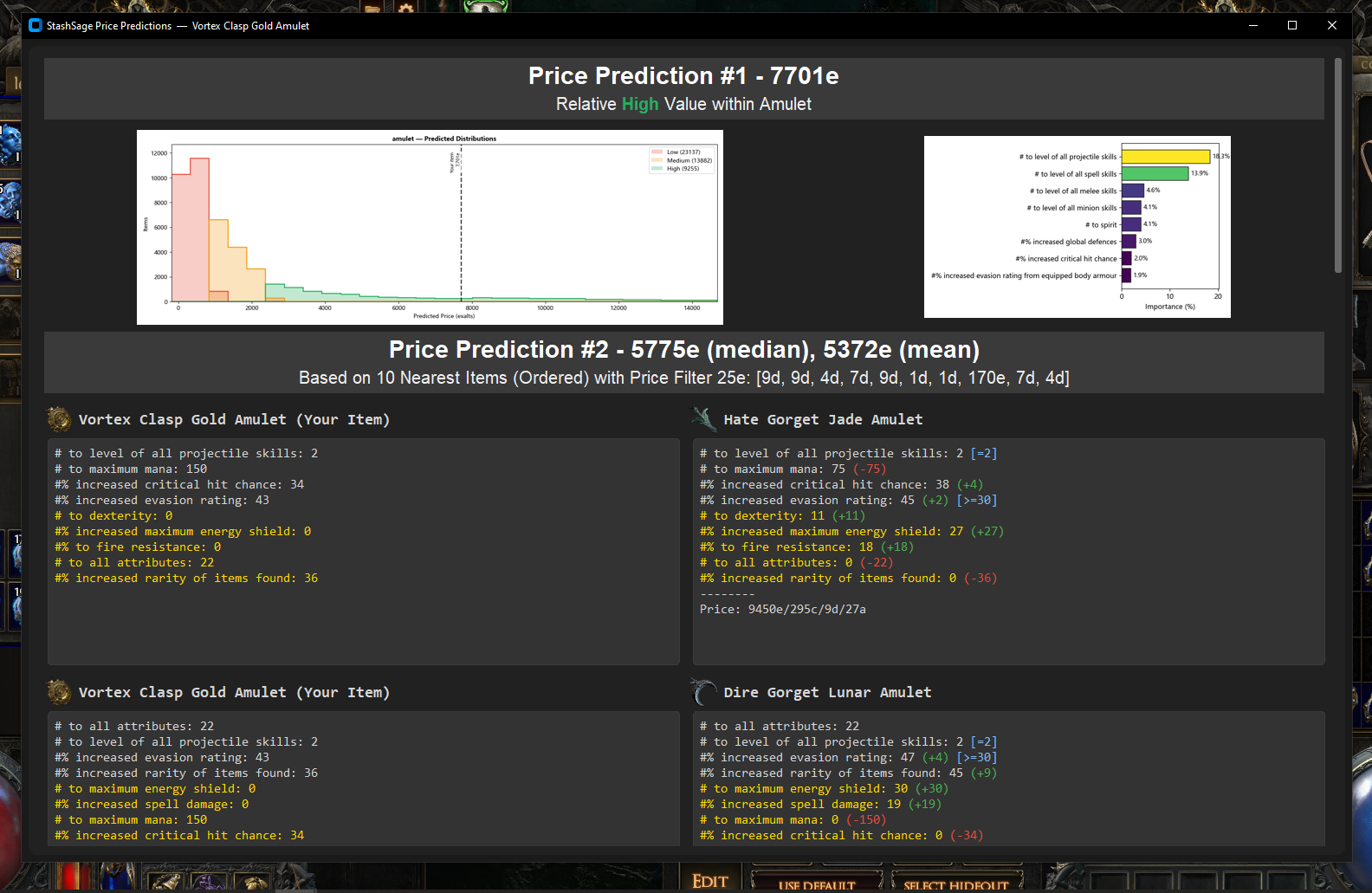
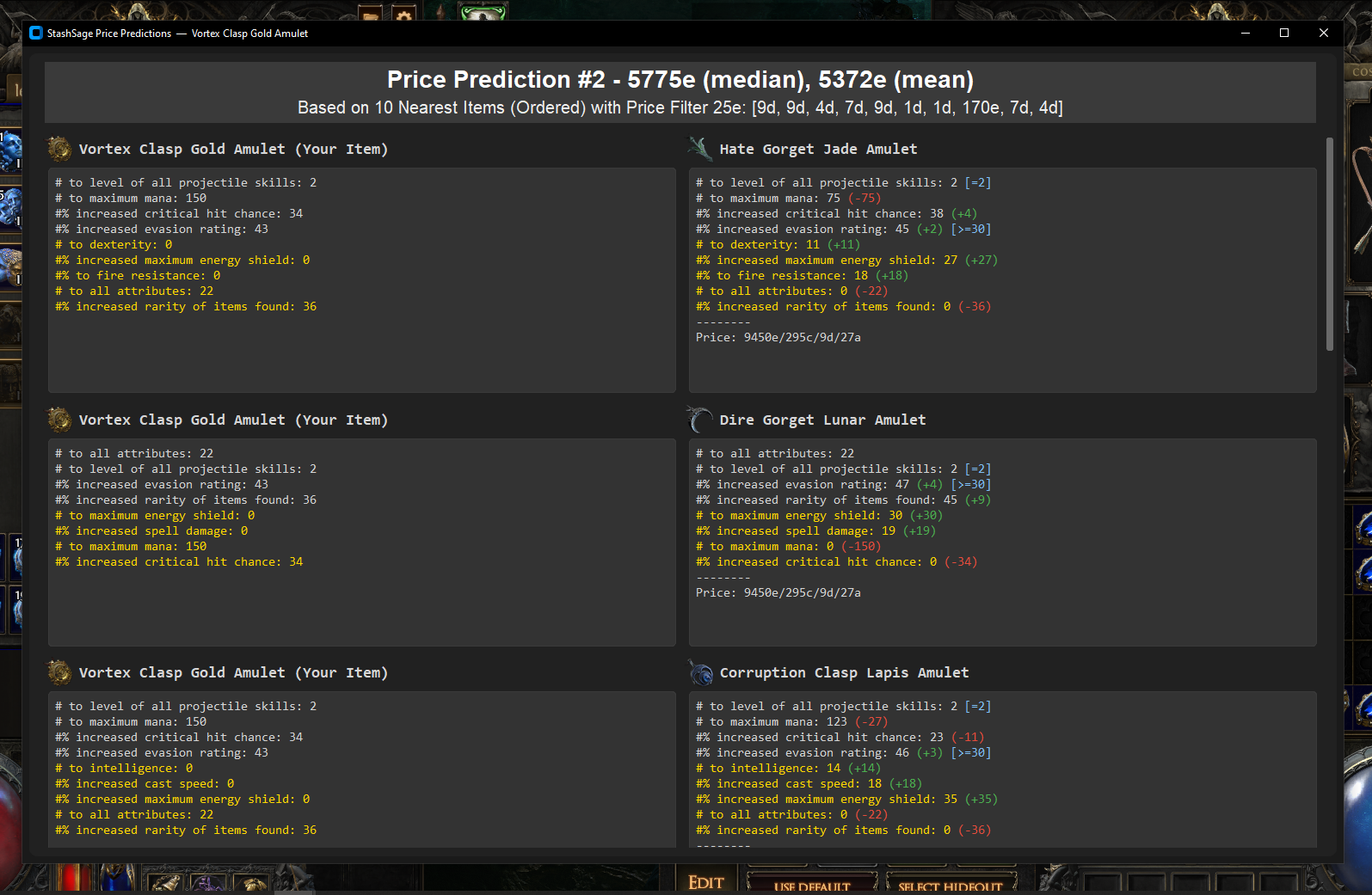
CTRL+2(or custom hotkey) to bring up the mod filters and filtered prediction overlay. - Review the predictions (#1 = xgboost, #2 = knn) and compare to similar items.
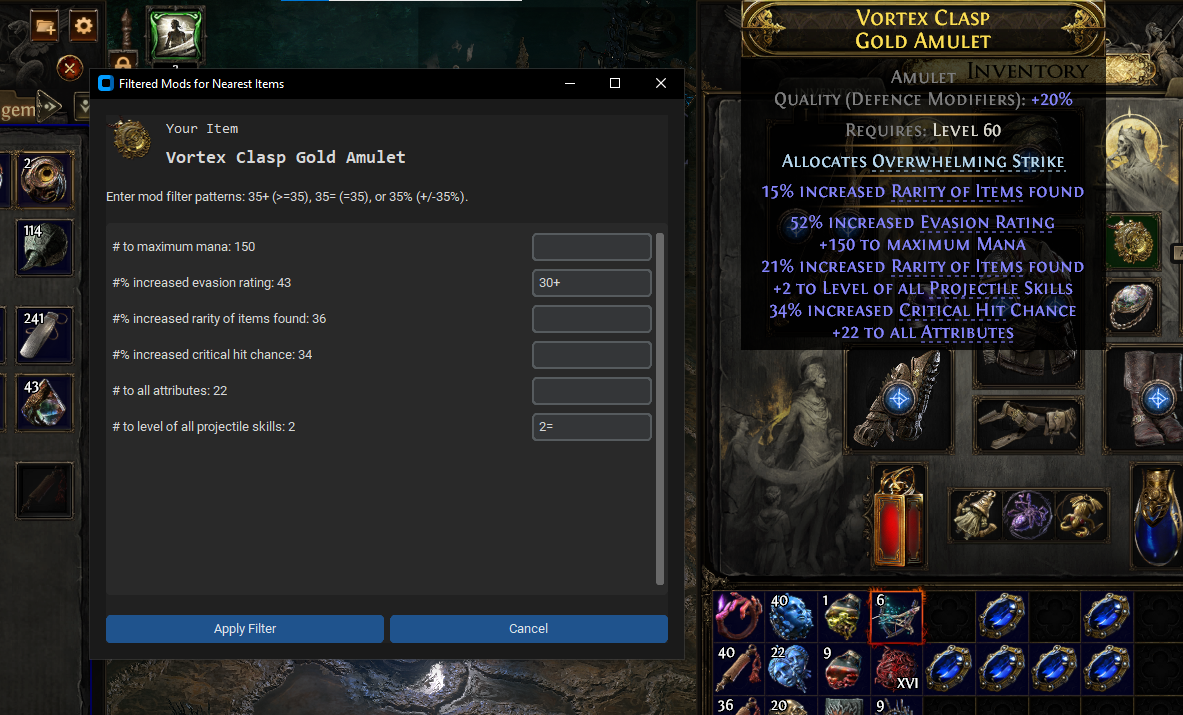
Prediction History
- Press
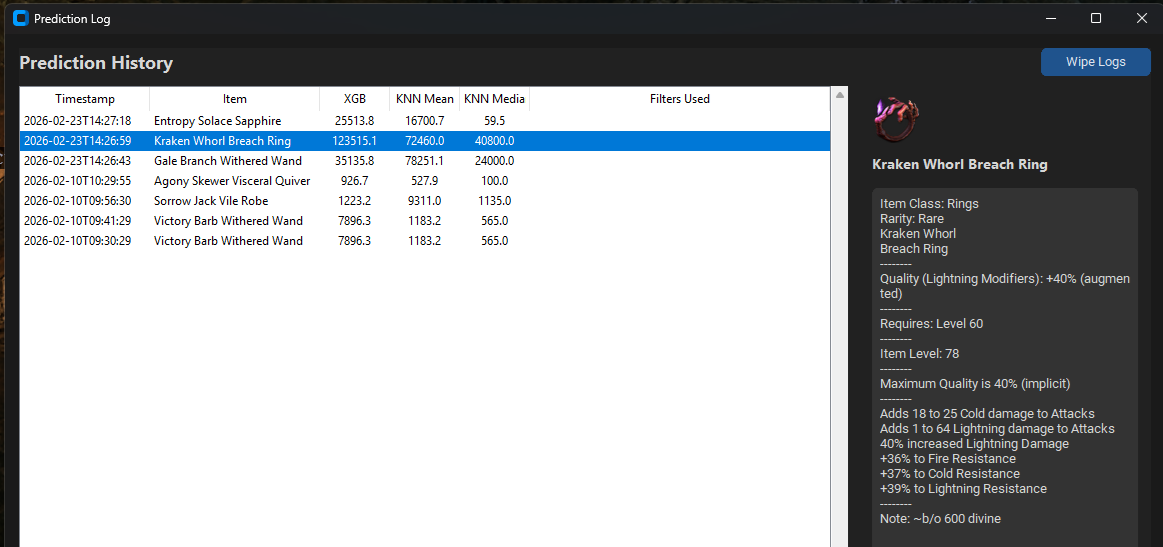
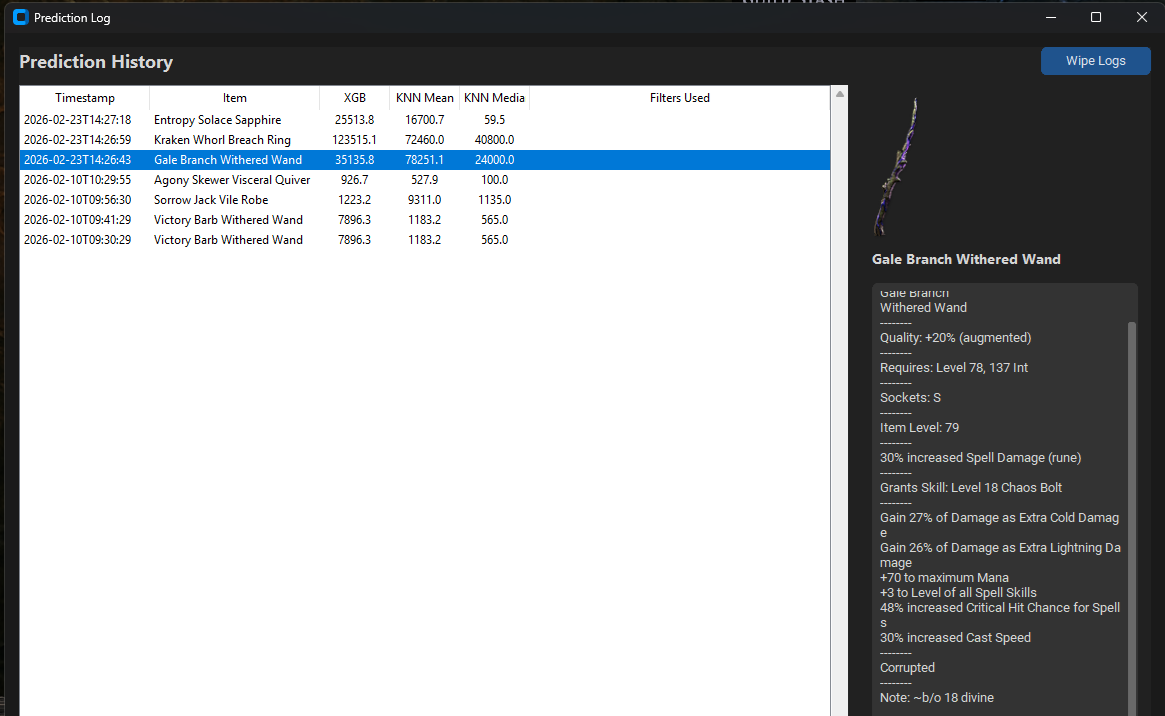
CTRL + 3(or custom hotkey) to bring up the prediction history overlay. - Review snapshots of previous item predictions, including the item descriptions.
- Compare to selling history in your Merchant tabs to assess quality of predictions.
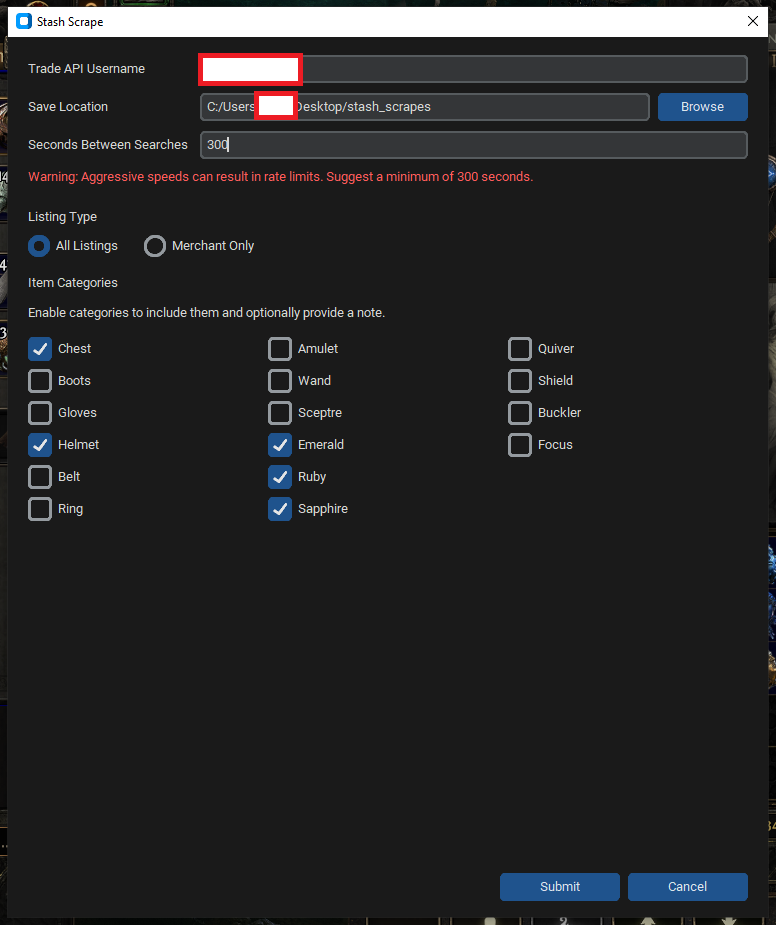
Using StashScrape
- Select StashScrape from the main menu.
- Enter your Trade API username and a target directory in which to save output files.
- Enter Seconds Between Searches; we suggest at least
300s to minimize rate limiting. - Select the listing type (All Listings = public premium stash tabs + merchant tabs).
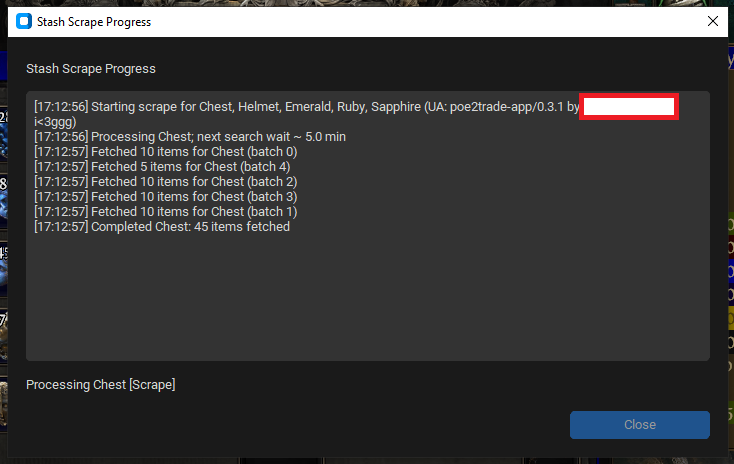
- Select the categories to scrape; each necessitates a separate search as in step 3.
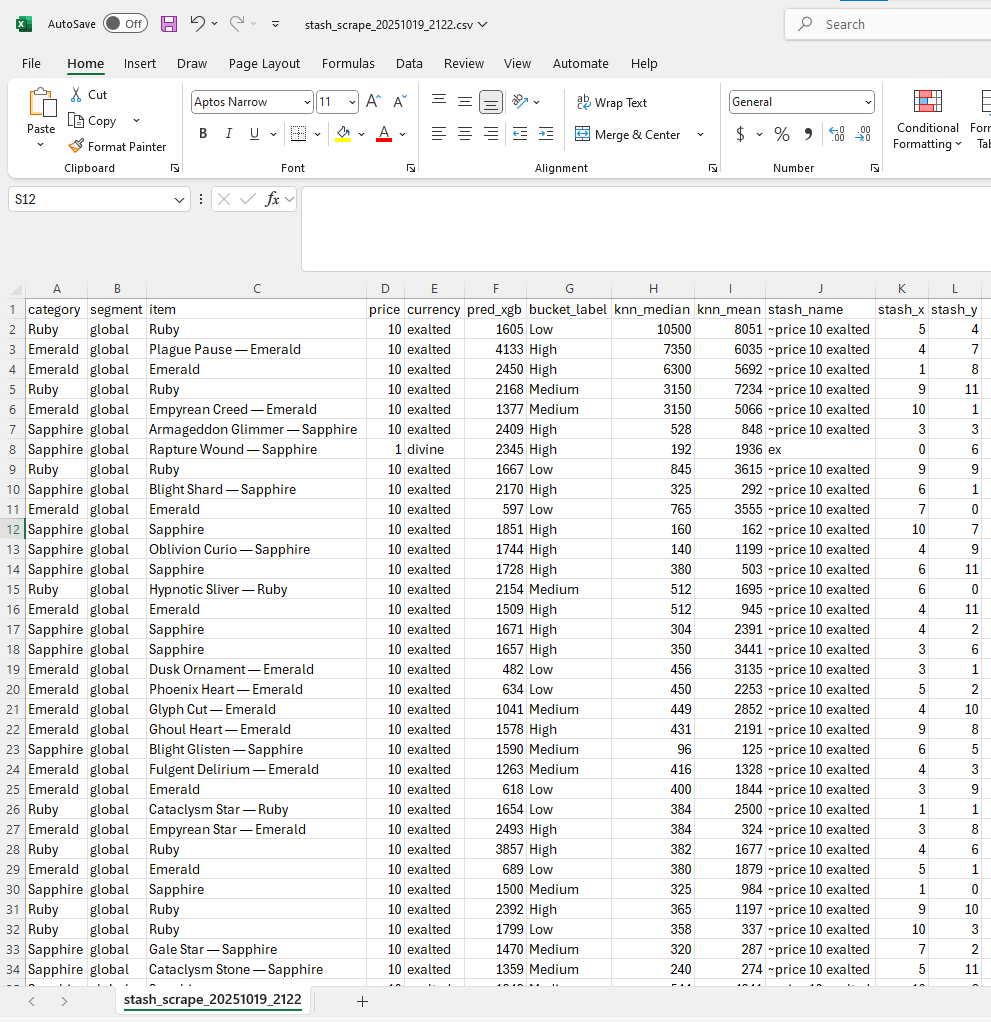
- Upon pipeline completion, fetch the output file from the target directory.
StashSage FAQ
What is StashSage?
StashSage is a free desktop price-checking and trade utility for Path of Exile 2. It estimates rare-item value, shows comparable listings, highlights influential modifiers, and supports stash pricing workflows.
How does StashSage estimate POE2 item prices?
StashSage runs two models side by side. Model #1 is an XGBoost regressor — a tree-based model that weighs each modifier and how modifiers interact, learned from the modifiers and listed prices of every item in the dataset. Model #2 is a nearest-neighbor (KNN) comparison that reuses XGBoost's modifier weighting to find the most similar listed items and takes their mean and median price. Both learn from current, unsold listings, so estimates are practical starting points, not guaranteed sale prices — even a fairly priced item may not sell.
Why do the two estimates sometimes disagree?
Model #1 (XGBoost) and Model #2 (KNN) take different approaches, so their numbers can diverge — treat them as two perspectives on the same item rather than one right answer. The Model #1 visualization also shows where an item's predicted value sits relative to other items in its category.
How should I read the comparison (Model #2) estimate?
KNN's neighbors don't have to match perfectly — a partial overlap on mods and values can still be a useful comparison. Be careful pricing items with fewer than six modifiers against six-mod items: ask whether your four-mod item is really closer to another four-mod item with the same mods at very different values, or to a five-mod item that shares three exact mods and adds two you don't have.
Which items are supported?
The pricing models are designed for rare Path of Exile 2 items. Magic and unique items are not the intended prediction targets, and support varies by item category and available training data.
Does StashSage upload my item or account data?
The desktop application performs its normal pricing operations locally. StashSage does not collect, store, or sell personal data; requests sent to third-party services are subject to those services' behavior and policies.
Which operating systems are supported?
Portable downloads are available for Windows and Linux. Windows users extract the complete ZIP and keep StashSage.exe beside its _internal directory.
What display mode should Path of Exile 2 run in?
The prediction overlay is optimized for Windowed Fullscreen. Other display modes may not render the overlay correctly.
How current are the pricing models?
New models are trained every few days and posted for download with StashSage releases. The version and build date at the top of this page identify the currently published application.
API Access
The same pricing engine behind the Discord bot is available as a small HTTP API for your own tools and scripts. Send it copied item text, get back a value estimate, comparable listings, and the modifiers driving the price — the same payload the desktop app renders.
Invite-only, best-effort. This is a small unpaid service, not a general-purpose developer platform. There is no uptime or stability guarantee, and the contract may change or pause without notice. Fine for personal tools and Discord bots; don't build anything load-bearing on it.
Getting access
Ask in Discord and we'll issue you an API key and the base URL. Keys are per-consumer — one can be revoked without affecting anyone else.
Authentication
Send your key on every request as an X-API-Key header, or as Authorization: Bearer <key>.
Rate limits
30 requests per 60 seconds per key (/predict and /predict-gui combined). Over the limit returns 429 with a retry_after_seconds field.
POST/predict
JSON request body:
| Field | Type | Required | Notes |
|---|---|---|---|
item_text | string | Yes | The full copied item text, exactly as pasted from the game (CTRL+C while hovering it). |
league | string | No | Installed league ID or exact name (case-insensitive), e.g. forbidden-rites or runes-of-aldur — see GET /leagues for what's currently installed. Omitting it uses the server's configured default league. An explicit value that isn't installed is rejected rather than silently falling back — see errors. |
source | string | No | Free-form label for your own usage tracking; does not affect the response. Use a short, stable slug for your client (for example poe2-companion). |
channel_id | string | No | Discord channel id, if calling from a Discord context. |
guild_id | string | No | Discord server (guild) id, if applicable; omit for DMs. |
Example request
curl -X POST "$STASHSAGE_API_URL/predict" \
  -H "X-API-Key: $STASHSAGE_API_KEY" \
  -H "Content-Type: application/json" \
  -d '{"item_text": "Item Class: Amulets\nRarity: Rare\n...", "league": "forbidden-rites", "source": "my-tool"}'
Example response — 200 OK
Trimmed; real responses include full modifier and neighbor detail.
{
  "request_id": "18a02c64be4a4b2f9927430956515957",
  "release": {
    "api_version": "0.5.15", "model_version": "0.5.15", "build_date": "2026-09-04",
    "training_data_as_of": "2026-09-03T14:06:02+00:00",
    "model_trained_at": "2026-09-03T14:32:16+00:00"
  },
  "league": { "id": "forbidden-rites", "label": "Forbidden Rites", "defaulted": false },
  "currency_conversions": {
    "divine_to_exalt": 394, "chaos_to_exalt": 40,
    "display": "1d = 394e,  1c = 40e"
  },
  "xgb": {
    "predictions": { "xgb": 3235.6 },
    "bucket": "High", "bucket_low": 1576.0, "bucket_high": 47280.0
  },
  "target_item": {
    "item_name": "Ghoul Touch",
    "mods": [ { "pattern": "+# to maximum Life", "value": 45, "display": "+45 to maximum Life" } ]
  },
  "knn": {
    "summary": { "count": 3, "median": 3100.0, "mean": 3180.5 },
    "neighbors": [
      {
        "item_name": "Ghoul Wrap",
        "price_exalts": 3100.0, "price_display": "3100e/78c/8d", "price_simple": "3100e",
        "mods": [ { "pattern": "+# to maximum Life", "value": 42, "display": "+42 to maximum Life" } ]
      }
    ]
  }
}
Response fields
The example above is trimmed. These are the blocks every 200 response carries. Fields may be added over time, so ignore keys you don't recognise rather than treating them as errors.
| Field | Notes |
|---|---|
request_id | Opaque id for this call. Include it when reporting a problem. |
release.api_version | Version of the StashSage release serving the request. It tracks the overall release — today it mirrors model_version — and is not an independent response-contract version, so a bump does not by itself mean the schema changed. |
release.model_version | Version of the published model bundle the server has loaded. |
release.build_date | Date that release was built. This is the build date of the API and model bundle, not the cutoff of the market data behind the models — see model and data freshness. |
release.training_data_as_of | When the market data behind this prediction was assembled, ISO 8601 UTC. This is the freshness signal to display — see model and data freshness. null when the model that answered has no usable timestamp. |
release.model_trained_at | When that model was trained, ISO 8601 UTC. Usually minutes after training_data_as_of; the gap is training time, not data age. null when unknown. |
release.build_commit, release.git_sha | Optional build identifiers, present only when the running deployment has them. Handy when reporting a problem; don't depend on them. |
league | {"id", "label", "defaulted"} — the league this prediction was priced against. defaulted is true when the request omitted league and the server's configured default was used. See GET /leagues for the installed set. |
currency_conversions | The rates this response's display strings were rendered with: divine_to_exalt, chaos_to_exalt (each a whole number of exalts), and a preformatted display line. Read currency conversions before using them for anything but display. |
xgb.predictions.xgb | Model #1 point estimate, in exalts. |
xgb.bucket, xgb.bucket_low, xgb.bucket_high | Value band the estimate falls into, with band edges in exalts. bucket_high is null for the open-ended top band. |
target_item | The server's own parse of the item you submitted — name, matched modifier patterns with their values, and computed DPS for weapons. Worth checking when a prediction looks wrong: it shows exactly what the models saw. |
knn.summary | count of comparable listings found, plus the median and mean of their prices, in exalts. median and mean are omitted — not null — when no neighbor had a readable price, so count is the only key guaranteed to be present. |
knn.neighbors | The comparable listings themselves, nearest first (ascending distance from your item). See neighbor objects for the per-neighbor fields. |
xgb_visual | Presentation-shaped copy of the estimate for the desktop overlay and Discord embeds: the same prediction, a bucket label prefixed with a colour block, and color_square. Mirrored to the top level as xgb_bucket, xgb_color_hex, and xgb_color_square. Read xgb instead — these are display sugar and change with the UI. |
updates | Desktop-updater block, attached only when the deployment has an update manifest configured. Not part of the pricing contract; ignore it. |
GET/leagues
Lists the installed leagues you can pass to /predict//predict-gui, and which one is the default. Same X-API-Key authentication as /predict; no request body.
{
  "default_league": "forbidden-rites",
  "leagues": [
    { "id": "forbidden-rites", "label": "Forbidden Rites" },
    { "id": "runes-of-aldur", "label": "Runes of Aldur" }
  ],
  "release": { "api_version": "0.5.17", "model_version": "0.5.17", "build_date": "2026-09-13" }
}
Only usable, fully-loaded leagues are listed — check here rather than hardcoding an id, since which leagues are installed (and which is default) can change between releases.
Neighbor objects
Each entry of knn.neighbors is one comparable listing. /predict and /predict-gui build neighbors with the same serializer, so these fields are identical on both endpoints.
| Field | Always present | Notes |
|---|---|---|
item_name | Yes | The listing's item name; an empty string when the source row carried no name. |
price_exalts | Yes | The listing's price in exalts, as a number. null when the row had no readable price. This is the field to compute on. |
price_display | Yes | The same price preformatted across all three currencies, "<exalt>e/<chaos>c/<divine>d" (for example 3100e/78c/8d), each rounded to a whole number using currency_conversions. null when the price is unreadable. |
price_simple | Yes | Short form in whichever currency the listing was posted in, e.g. 8d or 3100e. null when the price is unreadable. |
mods | Yes | The modifiers the neighbor was matched on: pattern (the normalized mod text, with # standing in for the value), value, and a rendered display. May be empty. Entries also carry a comparison against the same mod on your item when your item has it. |
base_type, icon_url, base_category | No | Present only when the item name resolves to a known base in the icon manifest. Absent — not null — otherwise, so test for the key. |
dps | No | Weapons only: the computed DPS figures for that neighbor. |
stash_name | No | Present only when the source listing carried one. |
Units
Every price and estimate in the response is a plain number of exalts (Exalted Orbs): xgb.predictions.xgb, the bucket edges, knn.summary.median, knn.summary.mean, and neighbor prices alike. Listings posted in divine or chaos are converted to exalts before training and comparison, so exalts are the single canonical unit throughout — there is no per-field currency to inspect. Use currency_conversions to render a value in another currency.
Currency conversions
The rates in currency_conversions come from the training-time sidecar of whichever league's model answered your request — they are not a live market feed, and they only move when that league is retrained and a new release ships. Because each installed league trains independently, the same item can convert at different rates in different leagues — always read currency_conversions from the response you got rather than caching a rate across leagues. They are exactly what every price_display and price_simple string in that same response was rendered with, which is why those strings are always internally consistent with each other. If you need a current divine or chaos price, take it from a live source and apply it to the exalt numbers yourself.
Model and data freshness
Listings are re-scraped and models retrained every few days, per category, and published with a StashSage release. Two timestamps in the release block describe the answer you just got:
training_data_as_of— when the feature matrix behind this prediction was assembled from scraped listings. This is the one to show users.model_trained_at— when the model itself was fitted on that matrix, normally minutes later.
Both are per model, not per release: categories retrain independently, so an amulet and a bow answered by the same deployment can legitimately report different dates. Both are also upper bounds — scraping precedes the matrix build, so the newest listing in the training data is somewhat older than the stamp. Neither is an exact market cutoff, and neither should be presented as one.
Either can be null when the model that answered carries no usable timestamp; treat that as "unknown" and fall back to release.build_date, which remains a coarse upper bound on the age of everything in the release. The keys are always present, so null means unknown rather than unsupported.
Versioning and change notice
Because api_version follows the release rather than the response contract, don't use it to gate on schema changes. Build your client to tolerate added fields, and ask in Discord if you want notice ahead of a contract change — the API is best-effort, but we would rather warn integrators than break them.
Errors
Every error response is {"error": {"code", "message", "details"}, "release": {...}}. details is omitted when there is nothing to add; on the codes below it carries request_id. /predict-gui shares /predict's league selection, authentication, and rate limits, so the same codes apply to both.
| Status | error.code | Meaning |
|---|---|---|
| 400 | bad_request | item_text is missing, empty, or could not be parsed as a valid item. |
| 400 | invalid_league | An explicit league value isn't installed, is retired, or is malformed — it never silently falls back to the default. Check GET /leagues for valid ids. |
| 401 | unauthorized | API key is missing, invalid, or revoked. |
| 404 | no_model | The item's category has no trained pricing model yet. |
| 429 | rate_limited | Too many requests for this key in the current window; see retry_after_seconds. |
| 500 | inference_failed | Prediction failed inside the model; include request_id when reporting it. |
| 500 | internal_error | Unhandled server-side failure. Carries no details, so quote the X-Request-Id header you sent when reporting it. |
| 503 | league_unavailable | league was omitted and the server has no valid default league configured (for example, multiple leagues installed with none chosen as default). Pass an explicit league from GET /leagues. |
Legal
Terms of Service
By downloading or using StashSage, you agree to these terms. This software is provided "as is," without warranties of any kind. You are responsible for how you use the app and for compliance with the terms of any third-party services you access. We may update or discontinue features at any time. To the maximum extent permitted by law, we are not liable for indirect, incidental, or consequential damages arising from use of the app.
Contact: datawiseguysllc@gmail.com
Privacy Policy
StashSage is designed for local operation. We do not collect, store, or sell personal data. Any data processed by the app (e.g., configuration, model inputs/outputs) stays on your device. If the app calls third-party APIs you authorize, the data is transmitted only as required to perform the requested operation and is not retained by us. Crash logs or analytics are not sent to our servers.
If this policy changes in the future, we will update this page and the app's release notes. For questions or requests, email datawiseguysllc@gmail.com.
Quick links: Terms of Service - Privacy Policy
Explore DataWiseGuys
Interested in learning more about other DataWiseGuys projects? Check them out below.
 SocialSync
- Seen us posting on X or Instagram? That was probably SocialSync, our social media automation app, doing the work. Check it out!
SocialSync
- Seen us posting on X or Instagram? That was probably SocialSync, our social media automation app, doing the work. Check it out!
Want to brainstorm developing your own app with analytics or machine learning? Reach out to us.